Soft Hub WARDOGS

Warianty

3
Soft Hub WARDOGS

Soft Hub WARDOGS

1-dni
Aktualne
Automatyczna
Dostępne
Preferowane
13,54 zł
Soft Hub WARDOGS

Soft Hub WARDOGS

7-dni
Aktualne
Automatyczna
Dostępne
Preferowane
45,07 zł
Soft Hub WARDOGS

Soft Hub WARDOGS

30-dni
Aktualne
Automatyczna
Dostępne
Preferowane
135,36 zł
Status Aktualne Son kontrol —

Funkcje produktu

Soft Hub WARDOGS

Players on screen

Player box
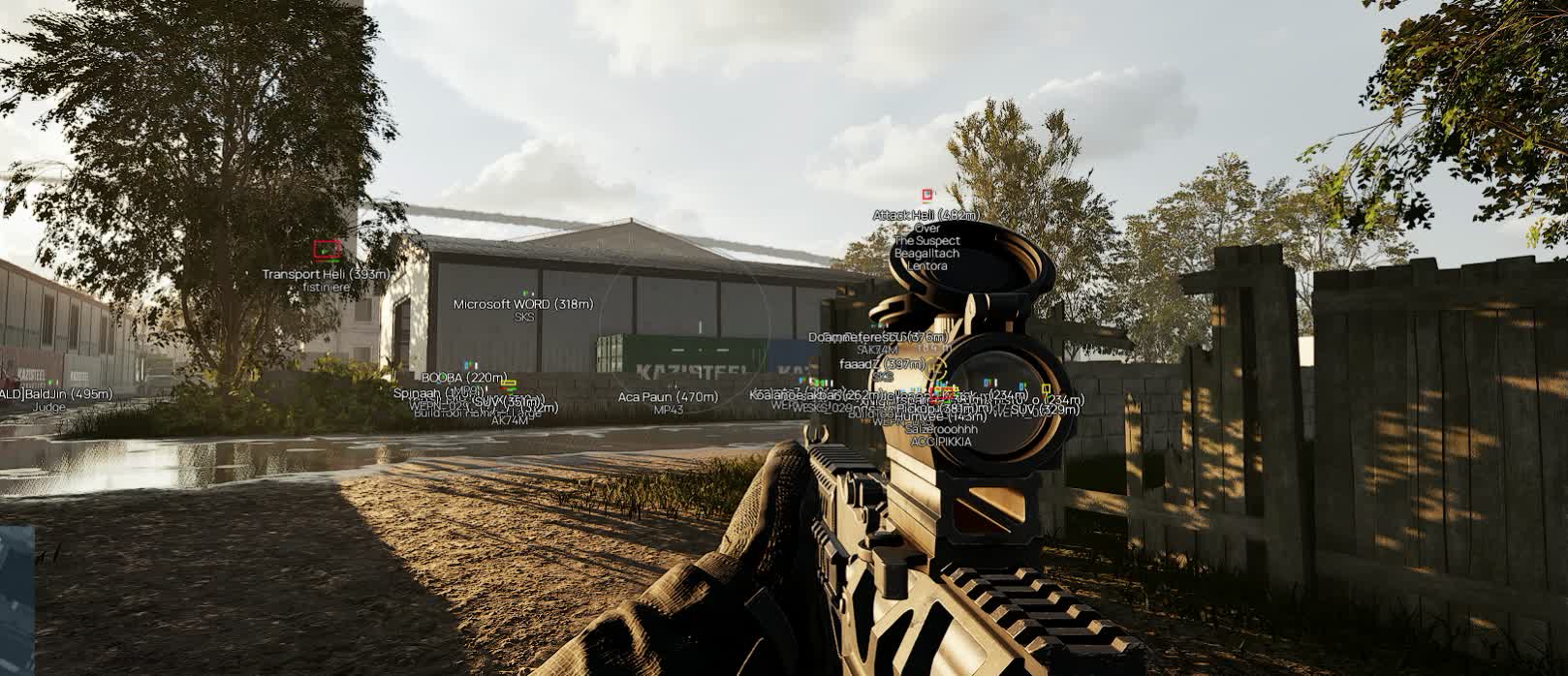
Box wraps an enemy in a rectangle. Prone and downed players are drawn as a flat box with no skeleton, and a downed one turns grey, so a body on the ground instantly tells you whether to finish it or move on.
Skeleton
Skeletons shows the pose: whether someone is crouched behind a berm, crawling, or already shouldering a rifle. It draws up to 150 metres; past that only the box stays, because the lines blur together anyway.
Squad colours
Squad colors hands every squad its own colour from a palette of eight. It kicks in when a squad has more than one member, while solo players keep their faction colour. Turn it off and the screen simply splits back into Valkyra, Lonestar and Manticore.
Labels above a target
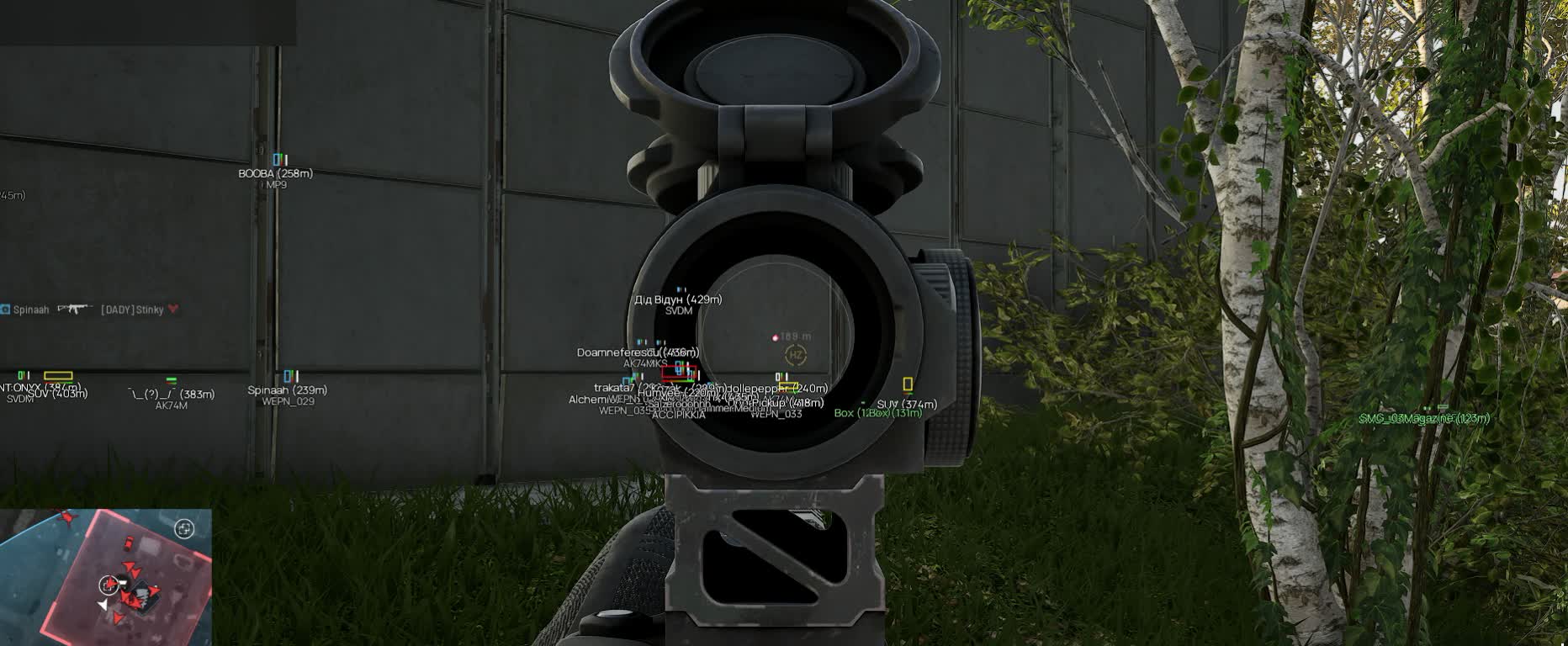
Info is the master switch for the text block. Inside it you separately enable the health bar, the white armour bar next to it, the name (bots read as BOT), the weapon in hand and the distance in metres.
Player inside a vehicle
Name, distance and weapon are not repeated under the box: anyone who climbs into a truck or a helicopter moves into the crew column under the vehicle's own label.

Vehicles and stationaries

Vehicle label
Vehicles/Stationaries prints the name and the distance, then lists the crew by seat with the driver first. You can tell an empty hull from one carrying four men ready to dismount. Friendly and allied vehicles are not drawn at all, so the screen stays readable.
Vehicle health
Health puts the hull's condition next to the label. That is what decides whether you spend a second rocket on a smoking truck or leave it.
Separate vehicle colour
Vehicle labels get their own colour, apart from infantry, so armour in thick woodland never reads as a man on foot.
True-size boxes
Boxes outlines loot and vehicles at their real dimensions. The marker matches the object, and a crate behind a rock stops looking like a tank on the next hill.

Loot

Dropped items
Dropped items highlights whatever fell off players. After a point is cleared you can see from cover whether anything useful is still lying there.
World loot
World loot covers what the map spawns on its own. Its own colour separates it from player drops on the same patch of ground.
Containers
Containers shows crates along with a list of what is inside. No more walking over and opening one for a single bandage: the contents are visible beforehand.
Supply crates
Supply crates get a colour of their own. In a game where every respawn loadout is bought with cash, gear picked up off the ground is money kept for the next life.
Loot distance
Distance prints the range next to the marker, so you can judge whether you will reach a crate while the zone is still in your faction's hands.

Aimbot

Enabling the aim
Aimbot is flagged as a risky option in the menu, and that label is honest. Running it non-stop is a bad idea, and the whole settings block only opens once the module is on.
Aim key
Aimkey binds the correction to a held key. Release it and the software stops touching your crosshair, so the aim is simply idle during the quiet phase of a match.
Aim point
Aim bone picks the head or the chest. Chest is steadier at range and on full auto, head ends a close contact faster.
Target highlight
Highlight aiming target marks whoever the software is holding right now in a colour you choose. Without it you cannot tell if the aim is tracking the man in front of you or a silhouette behind him.

Aim settings

Capture zone
Fov value sets the radius around the crosshair where a target is picked up, and Fov circle draws that zone on screen. Tuning the radius blind is guesswork; with the circle you see the edge.
Recoil control
RCS pulls the crosshair down while the left mouse button is held. The compensation ceiling in pixels and the force per tick are set separately, so a long AK-74 burst stays in the chest instead of overshooting downwards.
Prediction
Prediction works out lead from bullet speed and bullet drop, and those numbers come from the game itself, including the sight's current zeroing. Target speed is read from how the target moves, and for someone riding in a vehicle it is read from the vehicle.
Smoothness
Smoothness stretches the correction over time. The higher the value, the slower the barrel travels to the target and the less the snap stands out on someone else's clip.
Target priority
Priority By switches the logic between closest to the crosshair and closest by distance. The first suits a scrap on the objective, the second when the man twenty metres away matters more.

General settings

Render pacing
Four modes: Eco spares the processor, Balanced sits in the middle, Performance redraws more often, Unrestricted gives the smoothest picture while loading the CPU noticeably harder.
Player range
Enemy distance cuts infantry drawing off between 1 and 500 metres. In a two-by-two-kilometre zone the far edge is not your problem anyway.
Vehicle range
Vehicles distance runs from 1 to 150 metres and leaves only the armour that can actually reach you within the next minute.
Loot range
Items distance is also 1 to 150 metres. Without it, a long fight over a point buries the screen in drop markers from all around.

Opis produktu

Soft Hub WARDOGS

Soft Hub WARDOGS to aimbot do WARDOGS. ESP graczy: dystans, kolory, ukrycie party/gildii; Skeleton; Własne trasy i automatyka. Steam. Bez spooféra w paczce. Status: działa.

Soft Hub WARDOGS — WARDOGS

Soft Hub WARDOGS to aimbot do WARDOGS. ESP graczy: dystans, kolory, ukrycie party/gildii; Skeleton; Własne trasy i automatyka. Steam. Bez spooféra w paczce. Status: działa.

Co jest w środku

  • ESP graczy: dystans, kolory, ukrycie party/gildii
  • Skeleton
  • Własne trasy i automatyka
  • Vehicle label
  • Vehicle health
  • Separate vehicle colour
  • Skrzynie i drop: nazwa, dystans, rzadkość
Okno albo borderless. Bez spooféra w paczce. Windows: 10: all builds; 11: all builds. Steam. English.

Ryzyko

Prywatny soft to nie zerowy ban. Status na karcie. Bot na koncie farm, nie na mainie.

Szybka dostawa Natychmiastowa dostawa 24/7
Bezpieczna płatność 3D Secure + ochrona SSL
Najlepsza cena Rabat i gwarancja ceny
Gwarancja satysfakcji Bezpieczne i łatwe zakupy