Eclipse Lite

Biến thể

3
Eclipse Lite

Eclipse Lite

1-ngày
Cập nhật
Tự động
Còn hàng
Ưu tiên
76.339 ₫
Eclipse Lite

Eclipse Lite

7-ngày
Cập nhật
Tự động
Còn hàng
Ưu tiên
305.357 ₫
Eclipse Lite

Eclipse Lite

30-ngày
Cập nhật
Tự động
Còn hàng
Ưu tiên
610.713 ₫
Trạng thái Cập nhật Son kontrol —

Tính năng sản phẩm

Eclipse Lite

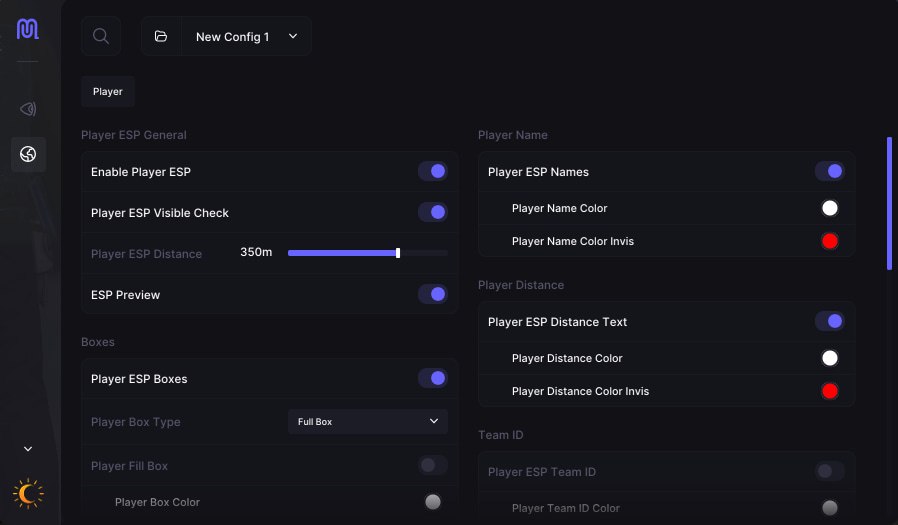
Player ESP, core settings

Enable Player ESP
The master switch for the whole system. Turns on ESP display for players on the server, and without it the rest of the settings do not work.
Player ESP Visible Check
Splits players into the ones you can see directly and the ones behind a wall. You set a separate color for each group, so in a fight you instantly know who you are dealing with.
Player ESP Distance
Manual control over render distance. You drop distant players from ESP and work only with the ones actually in the threat zone.
ESP Preview
Preview of your settings right in the menu, no need to leave for the game to see how ESP will look after edits.

Names and distance

Player ESP Names
Player nicks above the models. In team play you instantly see who is a teammate and who is an enemy, without wasting seconds thinking.
Player Name Color / Player Name Color Invis
Different nick colors for visible and invisible players. In thick forest or inside a building this reads faster than any other indicator.
Player ESP Distance Text
The numeric distance to a player next to the marker. You see the number and decide for yourself whether to push the fight or let the enemy walk.
Player Distance Color / Player Distance Color Invis
Distance text color for visible and hidden players, set separately for each situation.

Boxes

Player ESP Boxes
Rectangular frames around players through textures. One of the fastest ESP formats to read in a fast-moving fight.
Player Box Type, Full Box
The full box covers the whole model. It conveys the player's real position most accurately, standing, crouching or lying down.
Player Fill Box / Player Fill Color
Filling the box with color makes the marker visible on any background, in a night raid or in thick brush you really feel it.
Player Box Color / Player Box Color Invis
Box frame color for visible and invisible players is set separately.
Player Fill Color Invis
A separate fill for players behind cover. Instantly separates the ones in direct sight from the ones hiding.

Skeleton

Player ESP Skeleton
The model skeleton over the textures shows the player's exact pose, aiming, reloading or sitting in ambush behind a wall.
Player Skeleton Color / Player Skeleton Color Invis
Skeleton color for visible and hidden players is set separately.

Player states

Player ESP Teammates / Player Teammates Color
Teammates are marked with their own color in ESP. In a raid on a big base this rules out accidental friendly fire.
Player ESP Sleepers / Player Sleepers Color
Sleeping players are shown separately. When hunting for offline raid targets you do not have to run around the map blind.
Player ESP Wounded / Player Wounded Color
Wounded players are highlighted separately. You instantly see who to finish off and who is not getting back up.

Team ID

Player ESP Team ID
A team identifier above each player. You instantly see how many people are in the enemy group and how they are positioned.
Player Team ID Color / Player Team ID Color Invis
Team ID color for visible and hidden players is set separately.

Held item, text and icon

Player ESP Held Item Text
The name of the item in a player's hands right in ESP. You see what the enemy has, AK, shotgun or bolt, even before they peek out.
Player Held Item Text Color / Player Held Item Text Color Invis
Item text color for visible and invisible players.
Player ESP Held Item Icon
An item icon instead of or alongside text. In a fast fight it reads in a split second without reading the name.
Player Held Item Icon Color / Player Held Item Icon Color Invis
Item icon color for visible and hidden players.

View direction

Player ESP View Direction
A line from the player in the direction they are looking. You see whether the enemy is looking your way and slip in behind while they are distracted.
View Direction Length
The length of the view line adjusts manually to a format that suits you.
View Direction Color / View Direction Color Invis
Line color for visible and hidden players.

Chams

Player Chams Type
Paints player models through walls without ESP frames. Looks more natural than boxes and in some situations reads faster.
Hand Chams Type
Chams for your own hands in first person. Some players use this for better readability of their own position while aiming.
Weapon Chams Type
The weapon in enemies' hands is highlighted separately. You see the group's gear before you even make contact.

Other functions

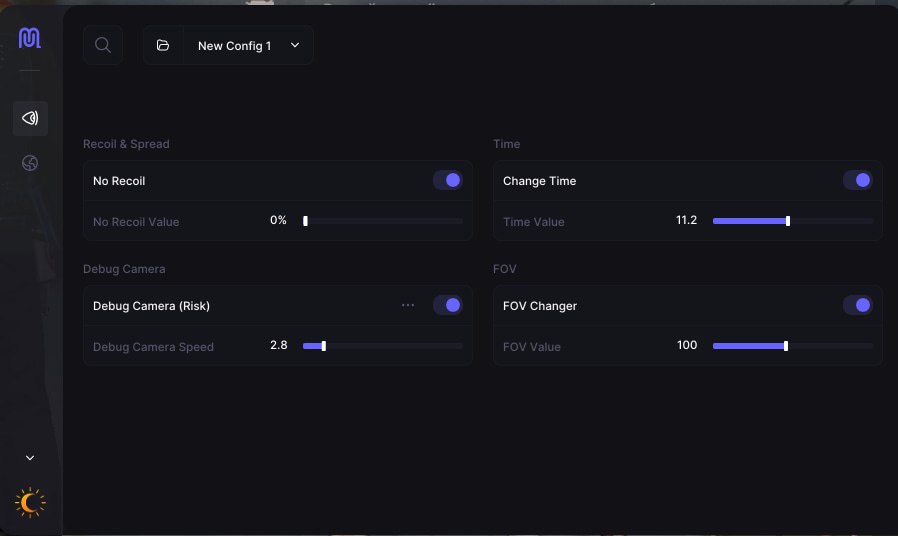
No Recoil
Removes recoil in software while shooting. All bullets land exactly on the aim point, with no need to learn recoil patterns by hand.
Debug Camera
A free camera for scouting buildings before a raid. You look inside a house, size up the layout and where the enemies are before you spend resources on getting in.
Fov Changer
Widens the camera's field of view. In close fights inside buildings the extra FOV degrees really affect the outcome.
Change Time
Switches the time of day on the client. You play in daylight while it is deep night on the server, full visibility, the advantage is obvious.

Mô tả sản phẩm

Eclipse Lite

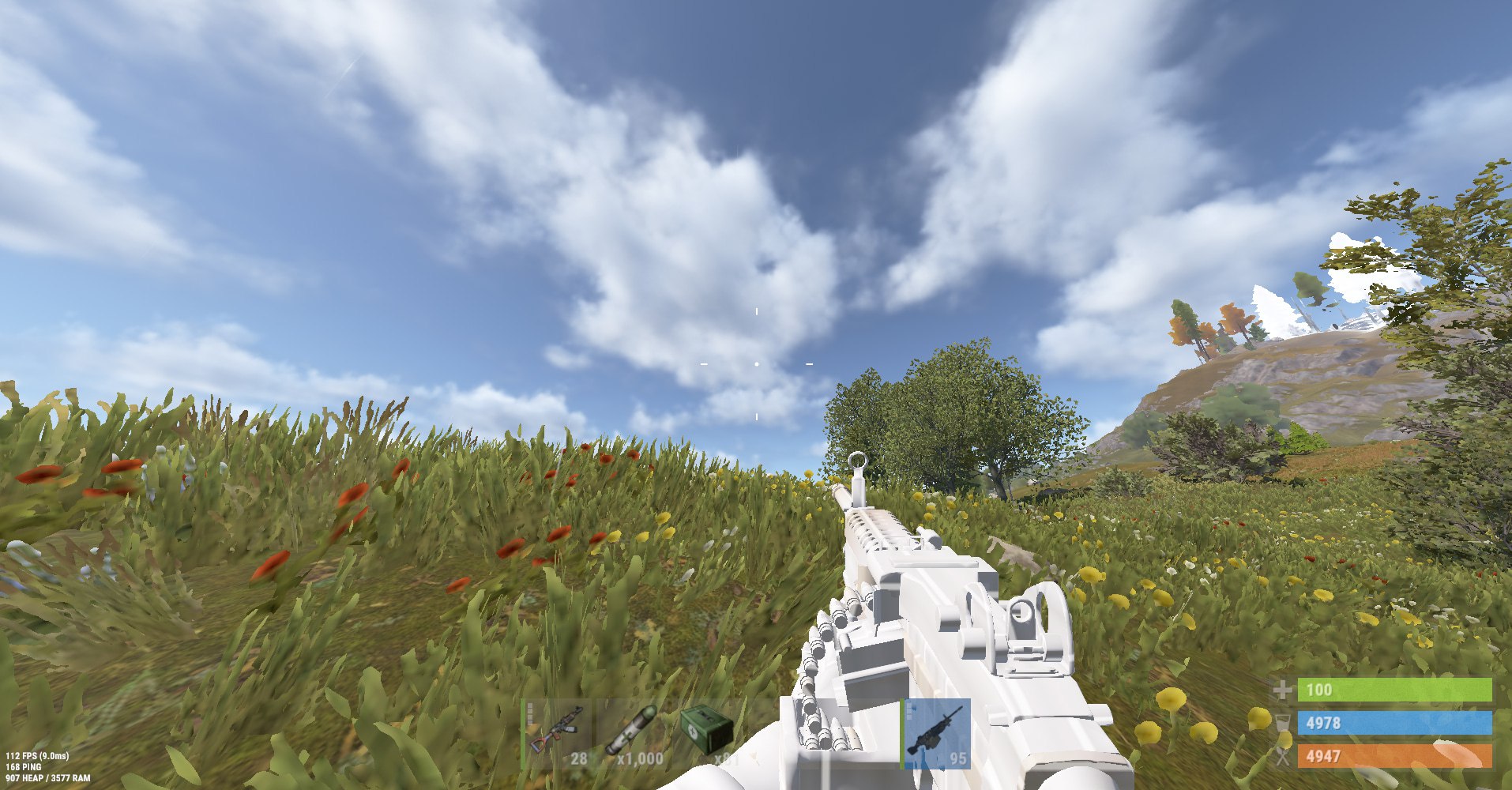
Eclipse Lite là ESP cho RUST. ESP người chơi: tầm, màu, ẩn party/guild; ESP Preview. Steam. Không kèm spoofer. Trạng thái: đang chạy.

Eclipse Lite — RUST

Eclipse Lite là ESP cho RUST. ESP người chơi: tầm, màu, ẩn party/guild; ESP Preview. Steam. Không kèm spoofer. Trạng thái: đang chạy.

Có gì trong gói

  • ESP người chơi: tầm, màu, ẩn party/guild
  • ESP Preview
Cửa sổ hoặc borderless. Không kèm spoofer. Windows: 10: all builds; 11: all builds. Steam. English.

Rủi ro

Cheat kín vẫn có ban. Xem trạng thái trên trang. Bot thì acc farm tách acc chính.

Giao hàng nhanh Giao ngay 24/7
Thanh toán an toàn 3D Secure + bảo vệ SSL
Giá tốt nhất Giảm giá và đảm bảo giá
Đảm bảo hài lòng Mua sắm an toàn và dễ dàng